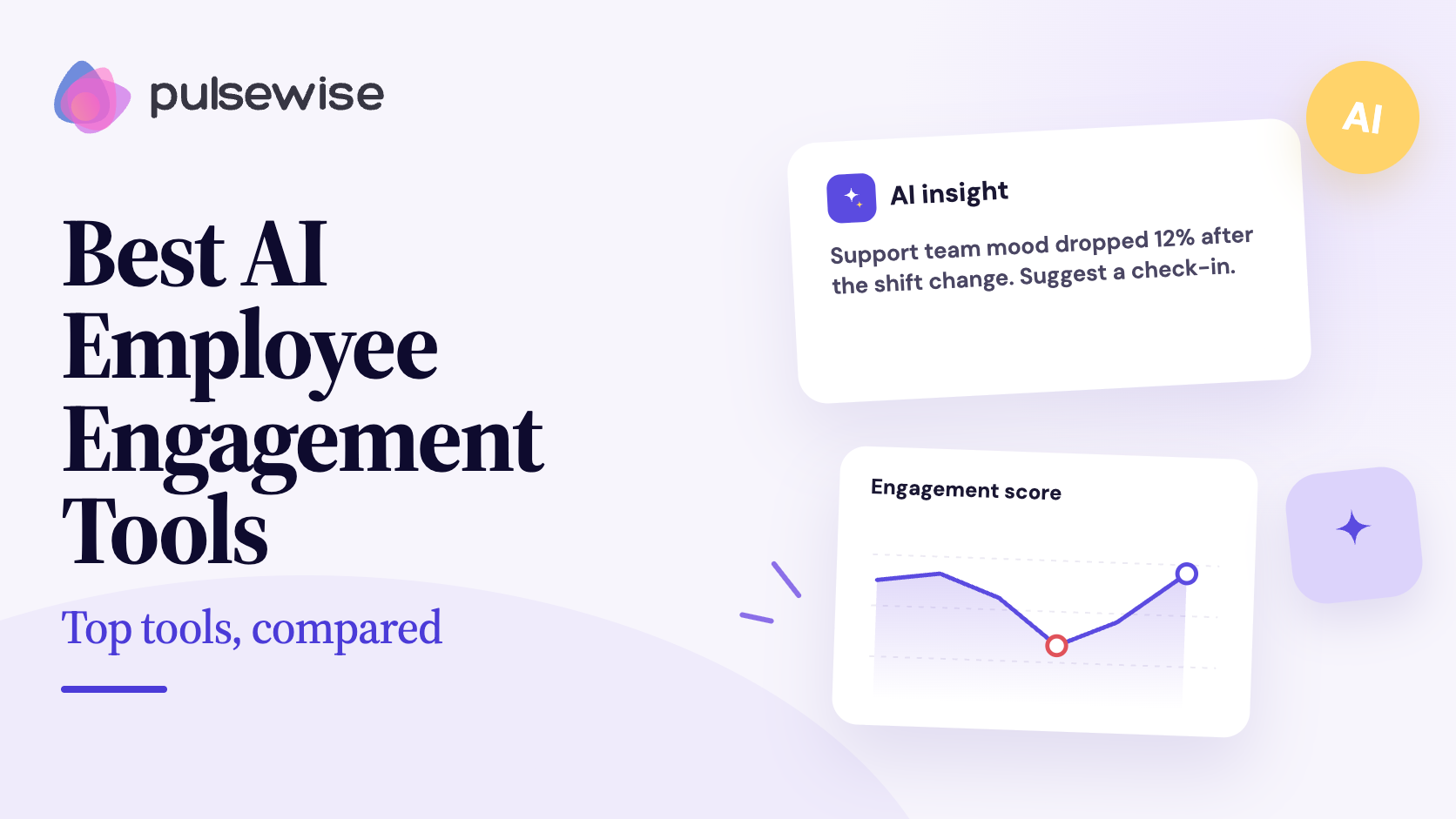
Every engagement vendor added an AI badge in the last 18 months. Open the demo, though, and “AI” can mean four very different things: a summary of last quarter’s comments, a chatbot that answers HR questions, a model that guesses who might leave, or a question that changes based on what an employee just said.
Those differences matter more than the badge. A comment summary saves an analyst a week, but it does not tell a manager what to do on Monday, and a flight-risk score can do real damage if it reaches the wrong person.
This guide explains how AI is actually changing employee engagement work, where it should stop, and then compares seven AI employee engagement tools on what the AI does in each one. Every price and rating was checked on the vendor’s own page, G2, and Capterra in October 2026.
TL;DR
- Best for AI inside the pulse itself, plus AI assistant access: Pulsewise, an emerging platform whose check-ins ask AI-personalized follow-up questions and whose MCP connection lets Claude or ChatGPT read aggregate pulse scores. Free forever for the first 100 eligible teams, up to 100 users.
- Best for survey science and benchmarks: Culture Amp, with AI Coach and AI comment summaries on every Engage plan. Quote-based.
- Best when engagement must sit beside performance: Lattice, with Engagement Insights and key driver analysis from $4 per seat per month, subject to a $4,000 annual minimum.
- Best all-in-one for EU-based teams: Leapsome, with AI survey analysis and a beta MCP connector. Engagement Surveys cost $4 per employee per month.
- Best for predictive driver analysis: 15Five, whose Predictive Impact Model estimates which survey items move engagement. Engage costs $4 per user per month.
- Best for simple manager-facing analysis: Workleap Officevibe, with one-click “Analyze” buttons across reports. Plans start at $4,999 a year.
- Best recognition-led option: Bonusly, whose Bizy assistant scores recognition quality. Team plan $5 per user per month with Bizy.
What AI actually does in employee engagement
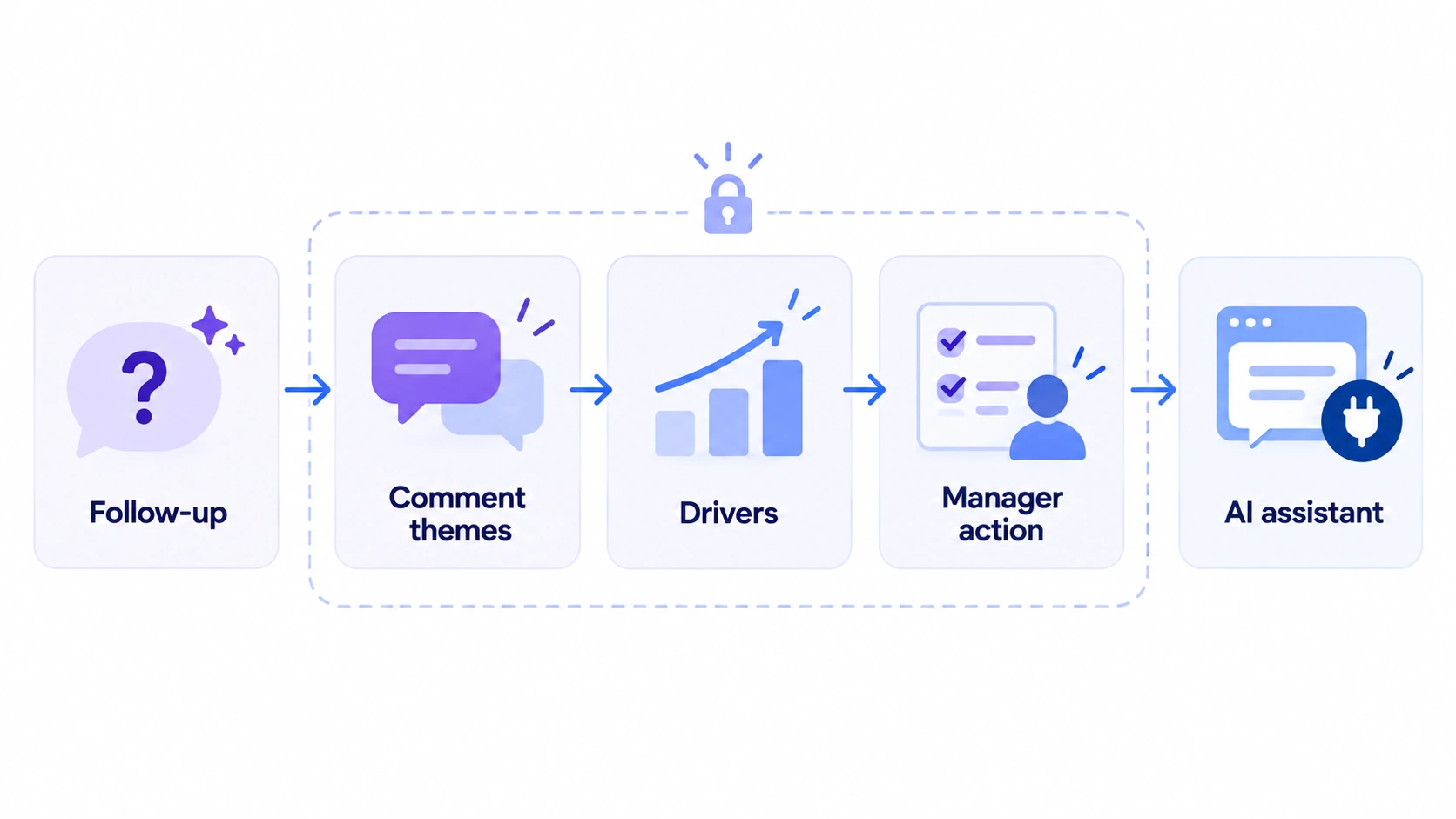
Strip away the marketing and AI in employee engagement does five jobs. Most tools do one or two of them well, and very few do all five.
1. Asks a better follow-up question
A classic pulse survey asks the same question to everyone and stops. An adaptive survey uses the first answer to choose the next question, so “I feel frustrated” can become “Is it competing priorities, unclear expectations, or a lack of support?”
That second question is where the useful signal lives. It turns a mood score into a reason, while the survey is still short enough that people finish it. Our guide to pulse surveys vs annual surveys explains why short, frequent check-ins outperform a once-a-year form.
2. Reads the comments for you
Open-text comments are the richest part of any survey and the part most teams never fully read. Generative AI now groups comments into themes, labels sentiment, and links each theme back to representative comments.
SHRM reports that HR teams are already using generative AI to design engagement surveys faster and to analyze open-ended answers more accurately than manual reading (SHRM). The best tools let you trace a summary back to the comments behind it, so leaders can check the AI’s work.
3. Finds the drivers and early signals
Driver analysis estimates which survey items are most connected to overall engagement or eNPS. Some tools now go further and predict how many points a team’s score could move if one driver improved.
This is also where attrition signals come in. Vendors combine engagement trends with HR data to flag teams where engagement is dipping, which can help you act before resignations arrive, as our employee turnover playbook describes.
4. Nudges managers toward an action
A dashboard alone rarely changes anything. AI now suggests a next step, such as running a priority reset or adding a workload topic to the next 1:1, and some tools let the manager assign an owner and a due date.
The value comes from follow-through, not from the suggestion itself. Our employee engagement action plan guide covers how to keep those actions small and visible.
5. Answers questions inside your AI assistant
The newest shift is the Model Context Protocol (MCP), an open standard that connects AI assistants such as Claude and ChatGPT to business apps. With an MCP connection, a manager can ask “How is my team’s workload score trending?” from the assistant they already use.
By October 2026, Pulsewise, Culture Amp, Lattice, Leapsome, and Bonusly all offered some form of MCP connection, with very different scopes. The comparison table below shows which ones include engagement data.
Where AI should stop
AI makes engagement data faster to read. It also makes it easier to misuse, so set these limits before you switch anything on.
Anonymity thresholds still rule
A comment summary for a team of four can identify the person who wrote it, even when no name appears. Insist that AI summaries, scores, and assistant answers follow the same minimum group size as the dashboard.
Check this for MCP connections too. A good connector returns aggregate scores only and shows nothing for groups below the threshold.
Privacy and regulation apply to the AI layer
The EU AI Act has banned AI systems that infer emotions from biometric data in the workplace since 2 February 2025, with narrow medical and safety exceptions (William Fry). Survey text is not biometric data, but GDPR still governs how vendors process it.
For EMEA teams, ask where AI processing happens, whether your data trains any model, and whether admins can switch AI features off. Several vendors in this guide let you disable AI entirely.
Humans make the people decisions
AI can suggest that workload deserves a conversation. It should not decide who is a flight risk, who gets a lower rating, or which team gets restructured.
Look for tools that label suggestions clearly, keep a person responsible for every action, and avoid individual risk scores built from anonymous answers. Bonusly, for example, states that its assistant will not flag anyone as “at risk”, and Pulsewise keeps anonymous pulse responses out of individual Reputation Scores.
Want AI that asks better questions, not just summarizes old ones? See how Pulsewise pulse surveys add AI follow-ups to a short check-in while keeping team insights behind minimum group sizes.
Comparison table: 7 AI employee engagement tools
Ratings were checked on G2 and Capterra on 19 October 2026. Prices come from each vendor’s own pricing page, in USD, as of October 2026.
| Tool | What the AI does in engagement | Engagement data in AI assistants (MCP) | G2 | Capterra | Pricing |
|---|---|---|---|---|---|
| Pulsewise | AI-personalized follow-up questions in check-ins; AI interprets pulse and mood across 11 health dimensions; AI-suggested team actions with owners | Yes: aggregate pulse scores, small groups hidden; Claude, ChatGPT, Codex, Cursor | Not listed yet | Not listed yet | Free forever for first 100 eligible teams, up to 100 users (pricing) |
| Culture Amp | AI Coach; AI comment summaries, comparisons, and sentiment; action recommendations; benchmarks | Yes: survey results and trends; registration for existing customers | 4.5 (1,623) | 4.6 (163) | Quote-based by company size (pricing) |
| Lattice | Engagement Insights: 2 to 7 comment trends, key driver analysis, recommendations | Partial: reviews, 1:1s, feedback, goals; engagement data announced as next | 4.6 (4,132) | 4.5 (207) | Engagement $4/seat/mo; $4,000 annual minimum (pricing) |
| Leapsome | AI summaries, themes, and sentiment; AI Copilot action plans; Resilience Signals | Yes (beta): survey results within your permissions | 4.8 (2,619) | 4.6 (102) | Engagement Surveys $4/employee/mo plus HRIS foundation (pricing) |
| 15Five | Predictive Impact Model; AI-synthesized comment themes and sentiment; Amaya Q&A agent | No first-party connector found | 4.6 (1,927) | 4.7 (895) | Engage $4/user/mo, billed annually (pricing) |
| Workleap Officevibe | ”Analyze” buttons for engagement, eNPS, metrics, and feedback; reply drafting | Pro plan lists MCP access | 4.3 (1,090) | 4.8 (115) | Standard from $4,999/yr + $32/manager/mo (pricing) |
| Bonusly | Bizy assistant: recognition quality scoring, recognition gaps, check-in trends | Yes: recognition data, not survey comments | 4.7 (7,398) | 4.8 (1,611) | Free up to 8 users; Team $5/user/mo with Bizy (pricing) |
How we evaluated each tool
We picked tools that serve companies of roughly 50 to 500 employees, work for hybrid or remote teams, and publish enough product detail to verify. Enterprise-first listening suites such as Qualtrics and Workday Peakon are left out on purpose.
For each tool, we checked four things on the vendor’s live pages and help centers:
- What the AI does: follow-up questions, comment analysis, driver or risk signals, manager actions
- Guardrails: anonymity thresholds, admin controls, whether AI can be switched off
- Assistant access: whether an MCP connector exists and what engagement data it returns
- Cost and reputation: published pricing, plus current G2 and Capterra ratings
Pulsewise is our own product, so we list it first and tell you plainly where it is still young. Everything else on this list is a capable tool with a clear best-fit buyer.
The best AI employee engagement tools in 2026
1. Pulsewise: best for AI inside the pulse and AI assistant access
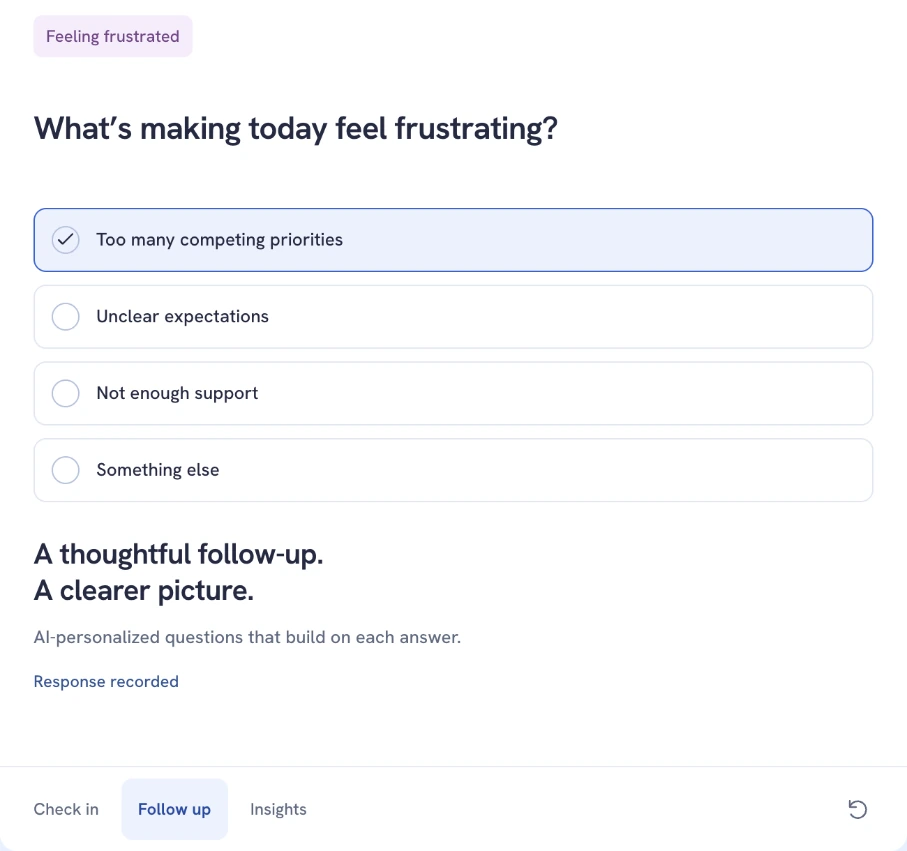
Pulsewise check-in: after a “frustrated” mood answer, an AI-personalized follow-up asks what is driving it. Source: pulsewise.io
Pulsewise is an emerging people platform that brings pulse surveys, kudos, feedback, goals, 1:1s, and performance reviews into one workspace. Its AI starts working during the check-in, not after the survey closes.
When someone answers a mood check-in, Pulsewise asks AI-personalized follow-up questions that build on that answer. A “frustrated” response leads to a short question about what is behind it, such as competing priorities or unclear expectations.
AI then interprets pulse and mood responses across 11 health dimensions, including Clarity, Workload, Psychological Safety, Manager Support, and Belonging. Scores appear on a 0 to 10 scale in aggregated Workspace Health, protected by minimum group sizes.
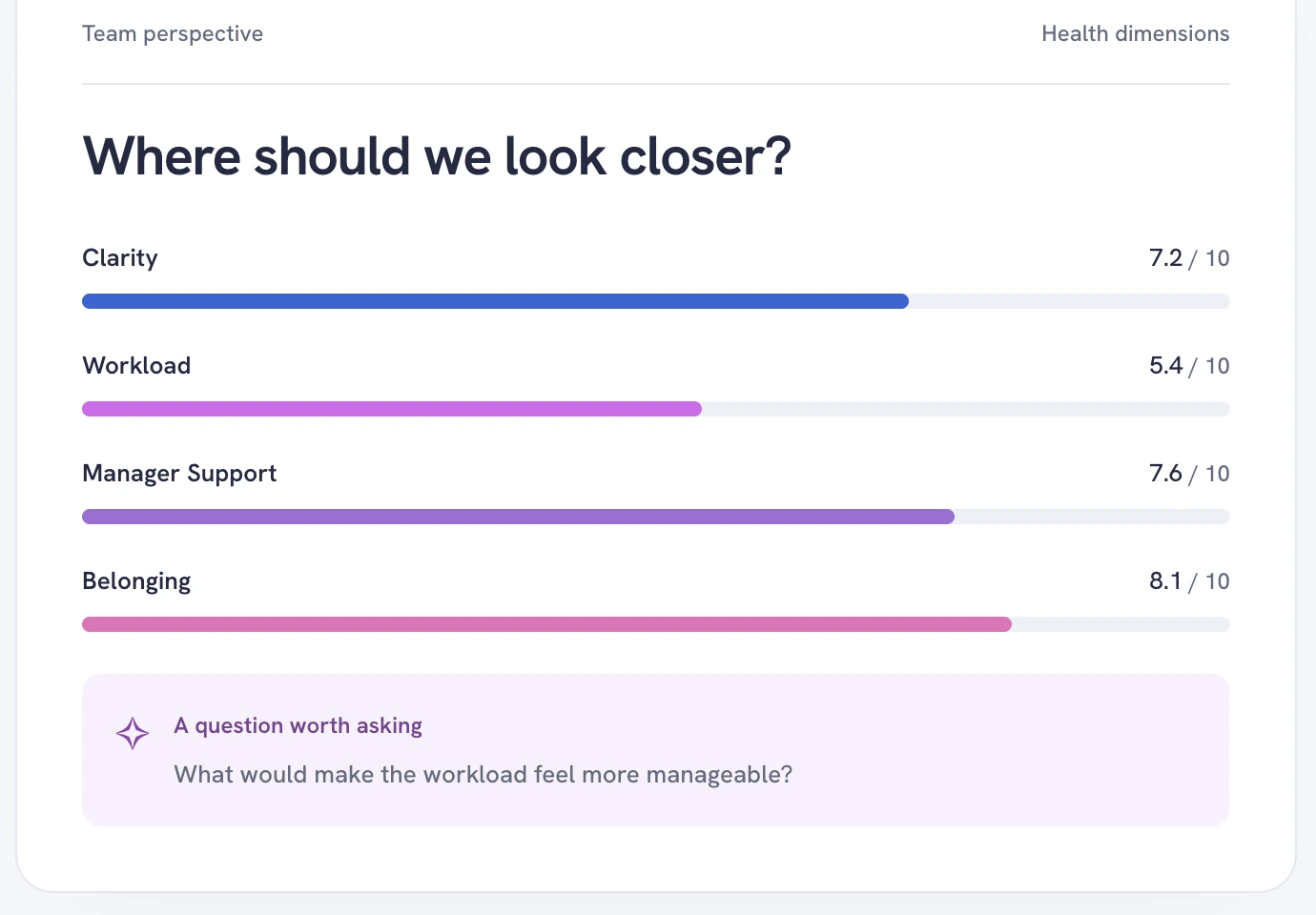
Pulsewise Pulse & insights: aggregated health dimensions compared across departments over six weeks. Source: pulsewise.io
Managers see AI-suggested team actions, such as a priority reset, and choose which one to run. An accepted action gets an owner, a due date, and follow-up measurement, and the product never reassigns work on its own.
The other differentiator is Pulsewise MCP. You can connect Claude, ChatGPT, Codex, Claude Code, or Cursor, choose read-only or read-and-act access, and ask questions like “How is my team doing on workload?” The assistant receives aggregate pulse scores only, and small groups show no score.
The same workspace adds AI-assisted themes in feedback, AI-prepared 1:1 agendas, and AI drafting help in performance reviews. Anonymous pulse answers never feed individual Reputation Scores, which keeps the health view honest and the personal view fair.
- AI highlights: AI-personalized follow-up questions; AI interpretation across 11 health dimensions; AI-suggested team actions with owners; MCP access with the same privacy floor as the app
- Pros: AI in the check-in itself, not only in reporting; engagement, recognition, goals, 1:1s, and reviews in one workspace; MCP makes no AI calls inside Pulsewise, so it uses no Pulsewise AI credits
- Cons: emerging platform with no G2 or Capterra ratings yet; no published industry benchmarks; AI features depend on plan, configuration, and available AI credits; compensation planning is still in development
- Ratings: not yet listed on G2 or Capterra; 5.0 on Product Hunt from 3 reviews
- Pricing: free forever for the first 100 eligible teams, one workspace, up to 100 users, subject to availability, as of October 2026. Paid plan prices are not published yet.
See the follow-up question for yourself. Explore Pulsewise pulse surveys and check whether your team qualifies for the free launch offer.
2. Culture Amp: best for survey science and benchmarks
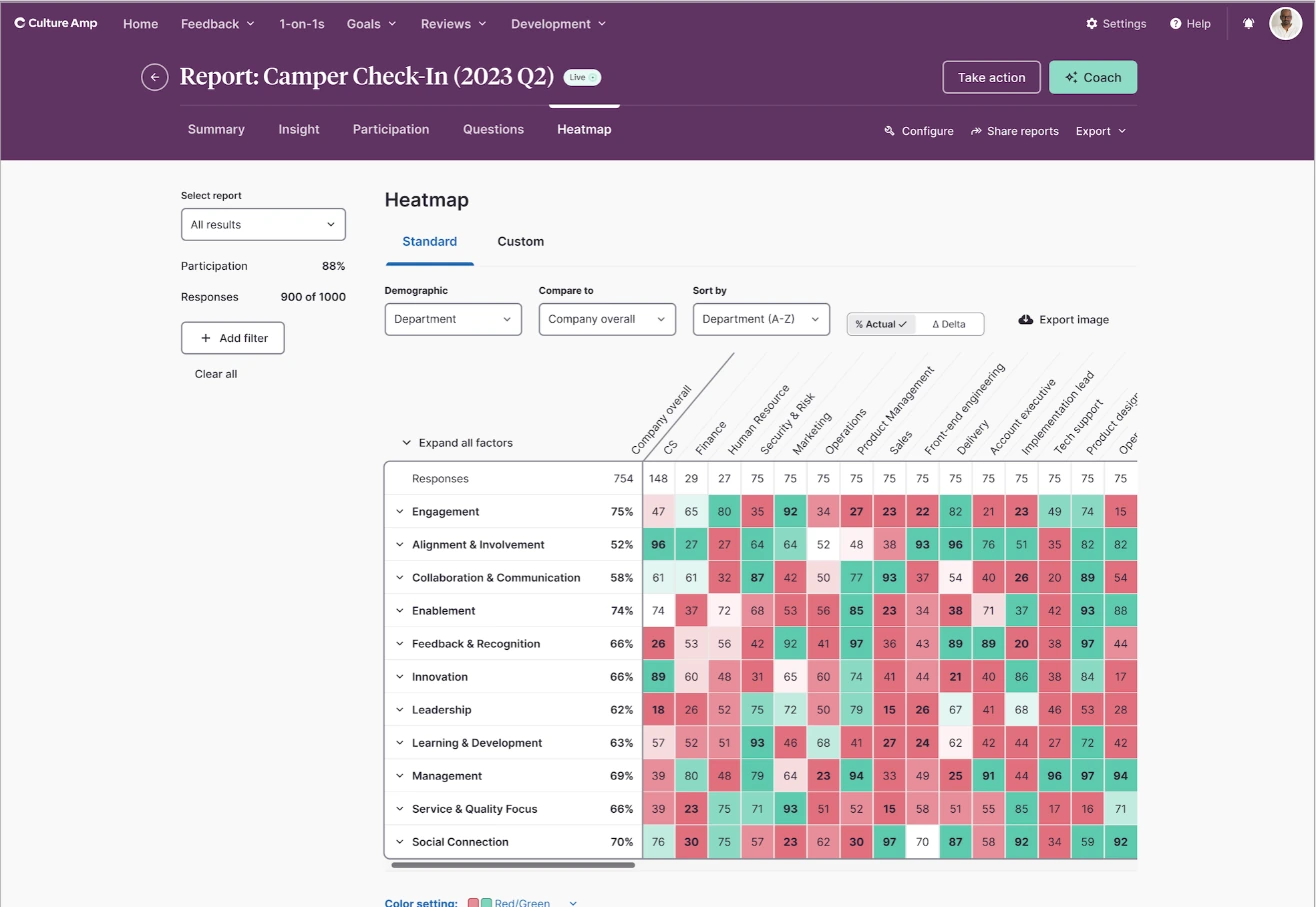
Culture Amp engagement report heatmap, with the Coach button in the header. Source: Culture Amp Support Guide
Culture Amp is the benchmark for survey science in mid-market and enterprise HR teams. Its AI sits on top of a large library of validated questions and industry benchmarks.
AI Coach is included in every plan. Inside an engagement report, Coach explores key themes, suggests concrete next steps, and drafts communications to share results with a team.
AI comment summaries condense rating and free-text comments into key points with sentiment, and you can trace each summary back to the comments behind it. Comment Summaries, Comment Comparisons, and Sentiment Analysis are available to all Engage customers, and admins can switch AI features on or off.
Culture Amp also launched an MCP connection for Claude and ChatGPT, currently open by registration to existing customers. It brings engagement results and trends, 1:1 notes, goals, and ratings into the assistant, under each user’s existing permissions. Our Culture Amp reviews roundup covers what customers say about the wider platform.
- AI highlights: AI Coach; AI comment summaries with traceable comments; comment comparisons; sentiment analysis; Retention Insights
- Pros: deep people science and benchmarks; AI features you can disable; strong reporting for larger survey programs
- Cons: quote-only pricing; engagement and performance are separate products; may be more platform than a 100-person team needs
- Ratings: G2 4.5/5 (1,623 reviews); Capterra 4.6/5 (163 reviews)
- Pricing: quote-based, with service tiers for under 200, 200 to 999, and 1,000+ employees, as of October 2026
3. Lattice: best when engagement sits beside performance
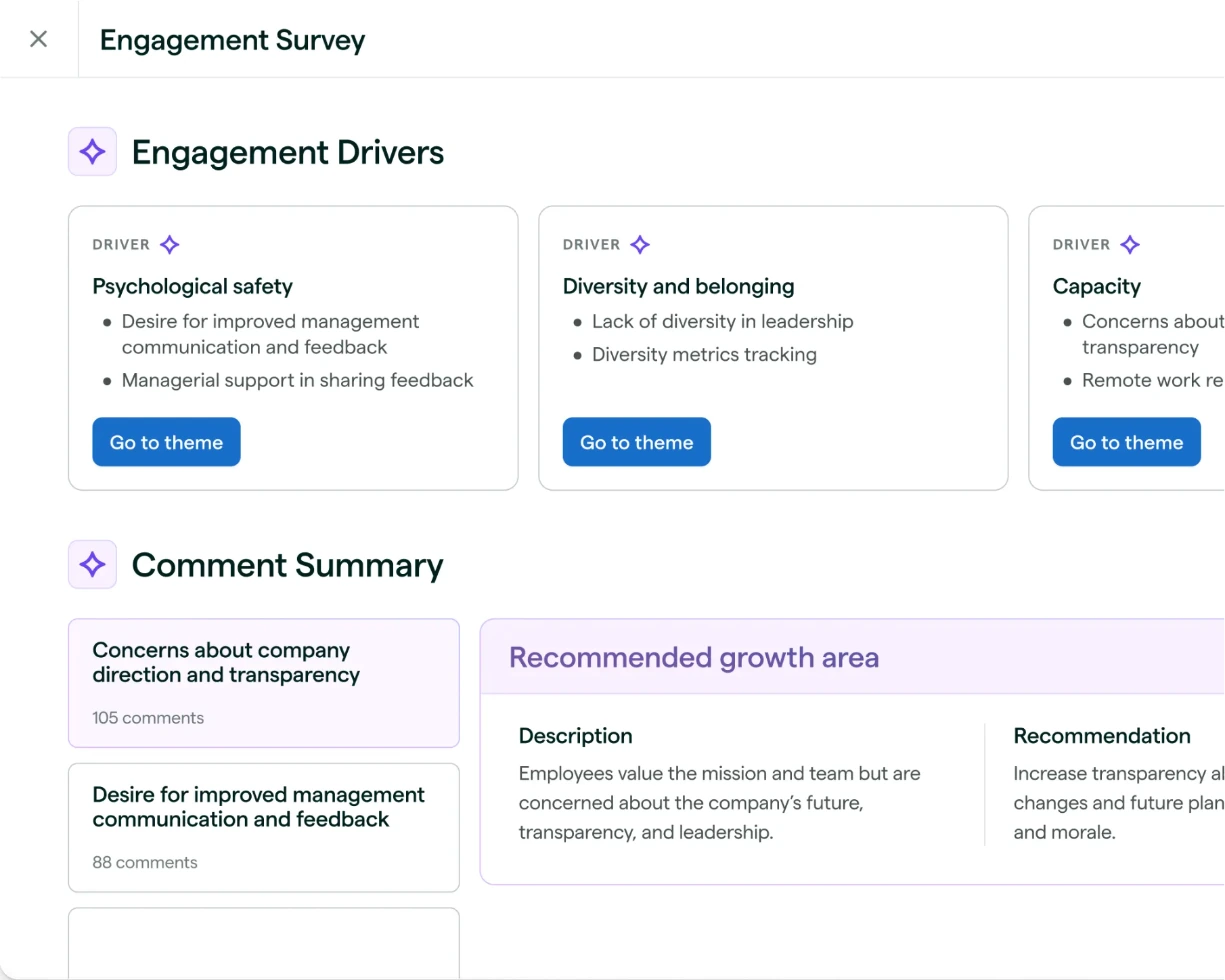
Lattice engagement survey results with AI-generated Engagement Drivers and Comment Summary. Source: lattice.com
Lattice is a performance-first platform with a strong engagement module. Teams that already run reviews and goals in Lattice often add engagement to keep both data sets in one place.
Lattice AI Engagement Insights summarize open-ended comments into two to seven trends, with summaries and recommendations. After a survey closes, key driver analysis surfaces the themes most linked to engagement, though your survey must include eNPS for that view.
An admin must turn on Lattice AI first, and insights can be shared with managers through saved views. The Lattice AI Agent is included with every base product and coaches managers in the flow of work.
Lattice MCP connects reviews, 1:1s, feedback, goals, and updates to Claude, ChatGPT, and Slack, and expanded to EMEA customers in August 2026. Lattice has said engagement data is next, so confirm its status in your demo. For a side-by-side view, see Pulsewise vs Lattice.
- AI highlights: Engagement Insights; key driver analysis; AI Agent for managers; MCP for performance data
- Pros: engagement and performance in one data set; transparent per-seat pricing; very large review base
- Cons: $4,000 annual minimum; key driver analysis needs eNPS; engagement data was not yet part of MCP at the time of writing
- Ratings: G2 4.6/5 (4,132 reviews); Capterra 4.5/5 (207 reviews)
- Pricing: Engagement $4 per seat per month; Foundations $13 per seat per month; annual billing and a $4,000 minimum annual agreement, as of October 2026
4. Leapsome: best all-in-one for EU-based teams
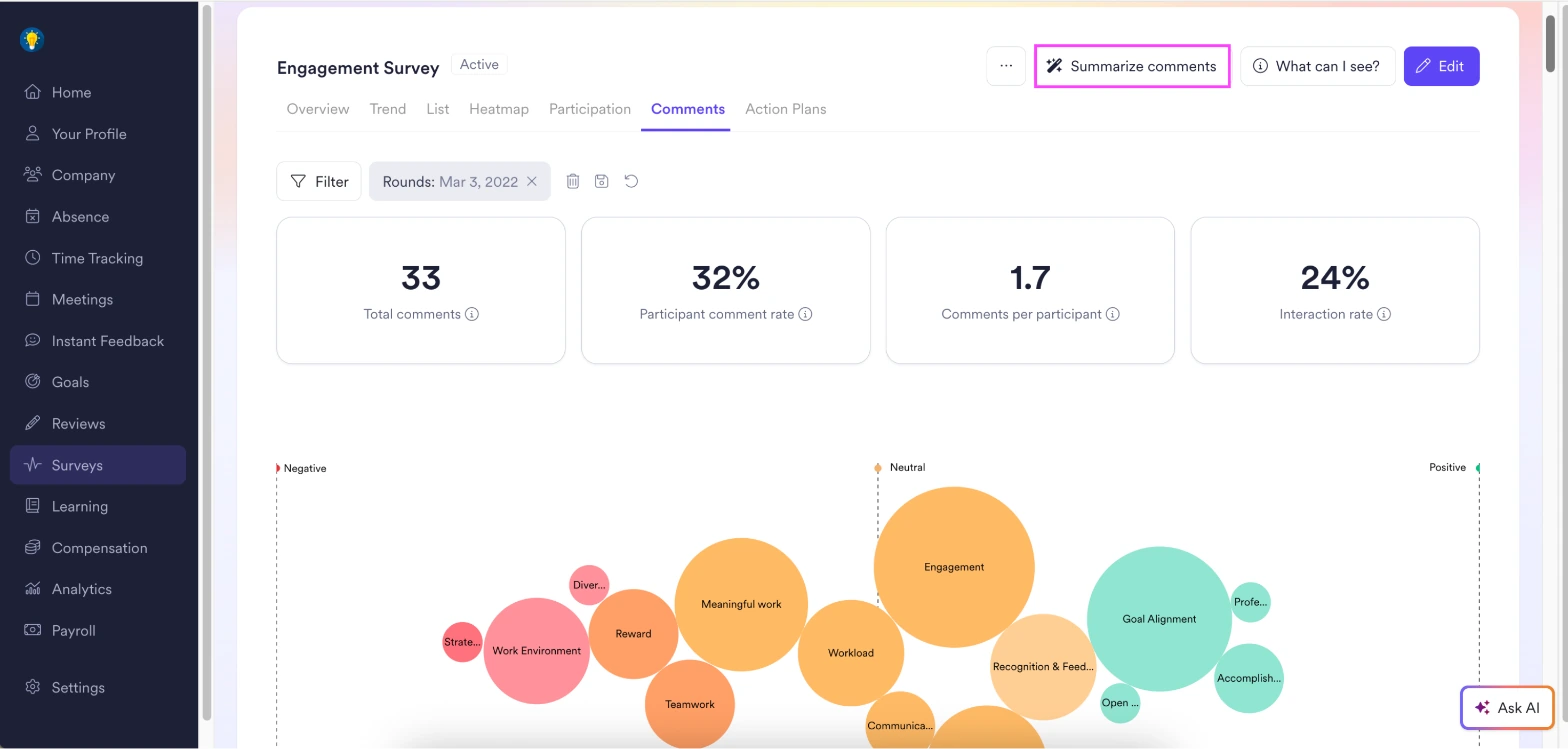
Leapsome engagement survey comments view, with the Summarize comments button and sentiment-grouped themes. Source: Leapsome Help Center
Leapsome combines engagement, performance, goals, learning, compensation, and HRIS in one modular platform. Its Berlin roots and GDPR focus make it a common shortlist pick for European companies.
Leapsome’s AI summarizes survey responses, surfaces key themes, and analyzes sentiment. Survey owners can generate a summary of all comments in a round with one click, and AI Copilot suggests action plans from the results.
Resilience Signals reads survey results alongside HRIS data and flags team-level patterns on the home dashboard, such as an engagement dip after a manager change. It requires Leapsome as your HRIS and respects anonymity thresholds.
Leapsome MCP, in beta, connects Claude and other MCP clients. Write actions are off by default, every action needs your confirmation, and all visibility and anonymity rules apply to survey data. Our Leapsome reviews post covers pros and cons in more depth.
- AI highlights: AI comment summaries; themes and sentiment; AI Copilot action plans; Resilience Signals; MCP in beta
- Pros: broad suite in one platform; surveys anonymous by default; strong fit for EU data expectations
- Cons: Resilience Signals needs Leapsome HRIS; modular pricing adds up as you add modules; MCP is still beta
- Ratings: G2 4.8/5 (2,619 reviews); Capterra 4.6/5 (102 reviews)
- Pricing: Engagement Surveys $4 per employee per month; Agentic HRIS Foundation $7 per employee per month, free with any Talent Suite module until 31 December 2026, as of October 2026
5. 15Five: best for predictive driver analysis
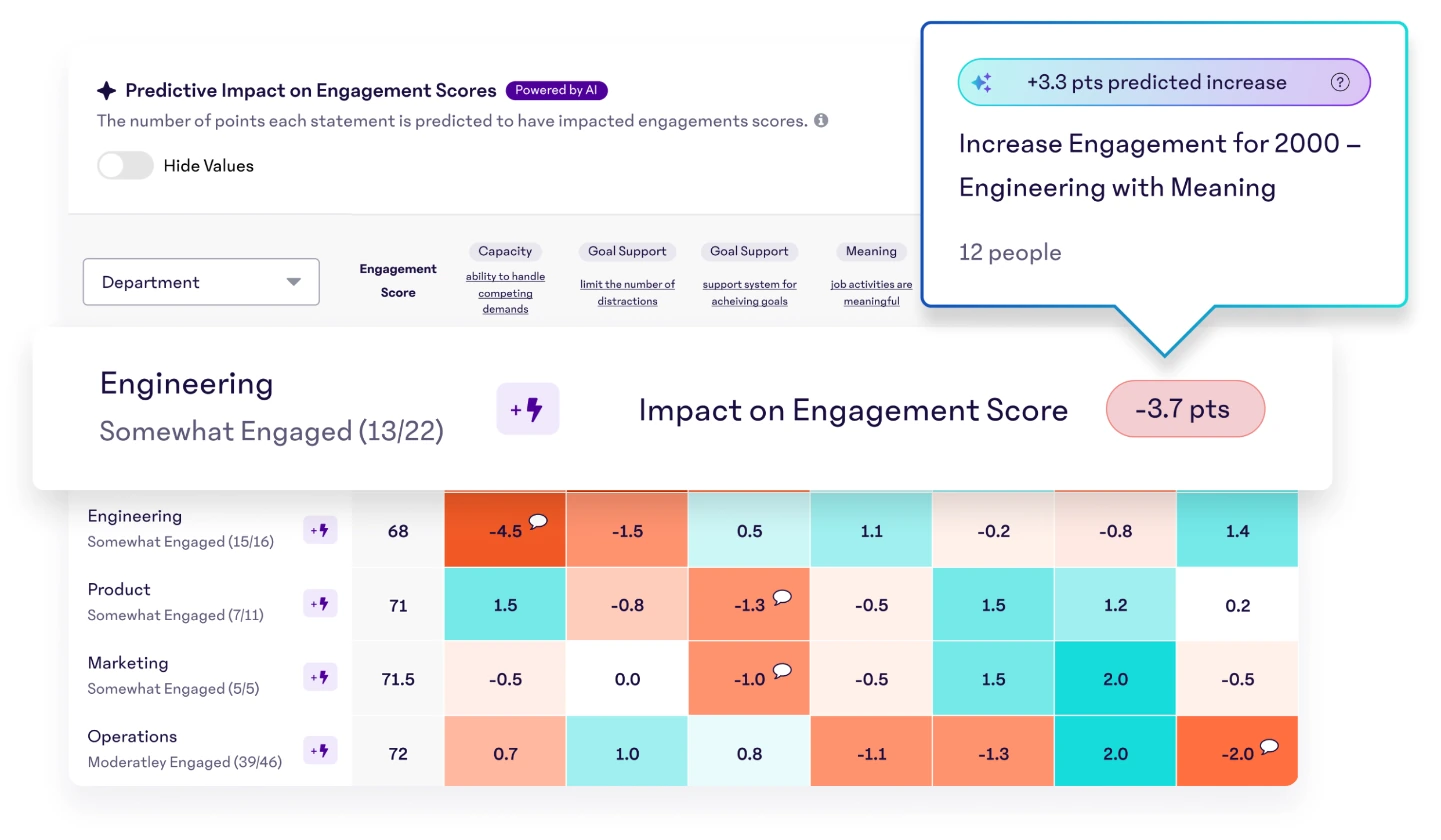
15Five Predictive Impact Model estimating how much each survey item moves a team’s engagement score. Source: 15five.com
15Five built its reputation on weekly check-ins and manager effectiveness. Its engagement product now leans on prediction rather than only description.
The Predictive Impact Model estimates how many points each survey statement is likely moving a team’s engagement score, so managers know which driver to work on first. AI Synthesized Feedback Insights turns open-text responses into themes and sentiment inside engagement reporting.
Amaya, launched in February 2026, is an ask-me-anything agent that answers questions about engagement and performance data with sources and charts. It works with eNPS and rating data but does not currently analyze open-text engagement comments.
Kona adds AI coaching and note-taking for 1:1s as paid add-ons. We did not find a first-party MCP connector documented on 15Five’s site at the time of writing. See our 15Five alternatives if you are comparing options.
- AI highlights: Predictive Impact Model; AI-synthesized comment themes; Amaya Q&A agent; Kona AI coaching add-on
- Pros: clear “what to fix first” view; strong manager enablement; published per-user pricing
- Cons: Amaya does not read open-text engagement comments; AI coaching is a separate cost; no documented MCP connector found
- Ratings: G2 4.6/5 (1,927 reviews); Capterra 4.7/5 (895 reviews)
- Pricing: Engage $4, Perform $11, Total Platform $16 per user per month, billed annually; Kona Coach $19 per manager per month, as of October 2026
6. Workleap Officevibe: best for simple manager-facing analysis
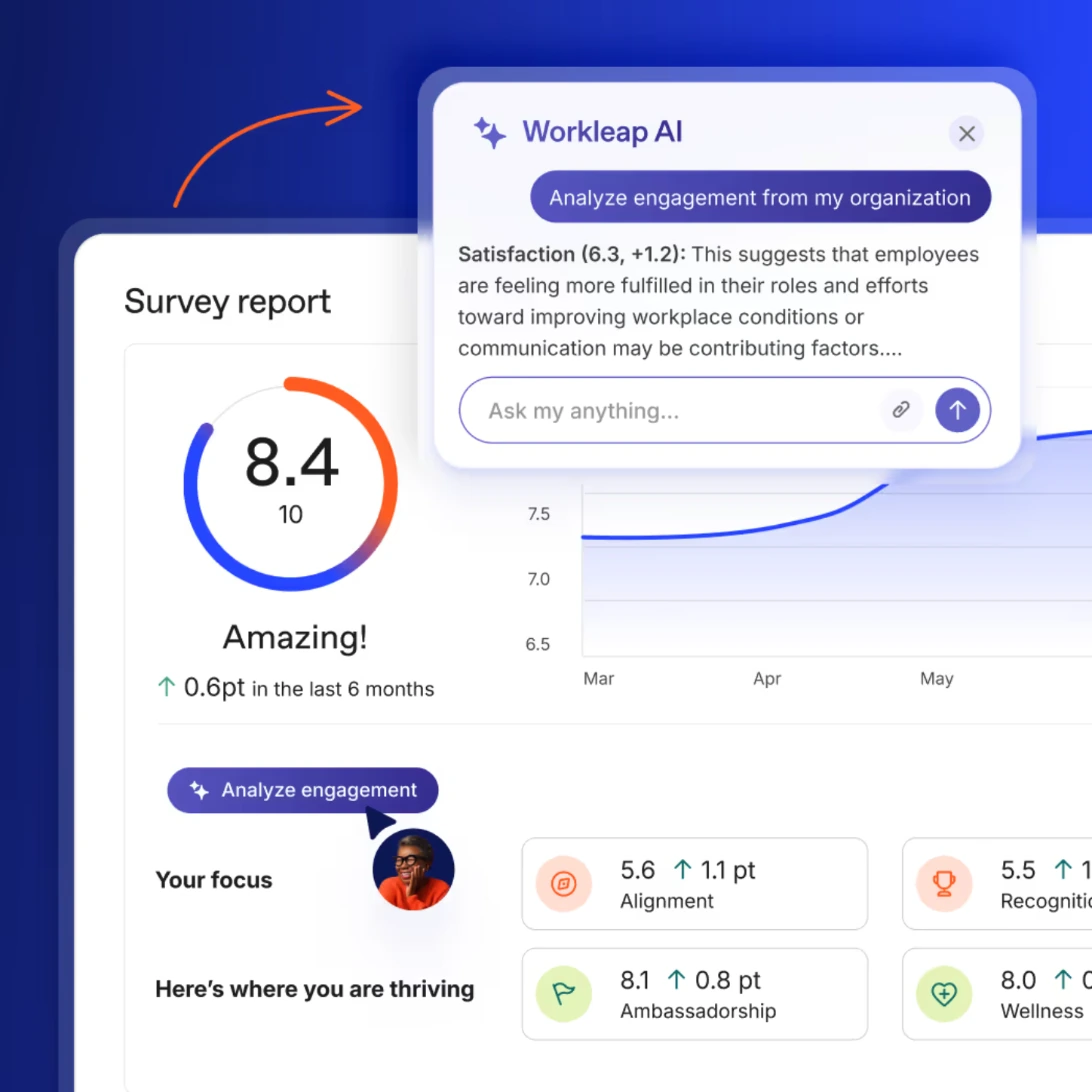
Workleap Officevibe survey report with the Analyze engagement button and Workleap AI panel. Source: workleap.com
Officevibe, now part of the Workleap platform, is built around short pulse surveys and anonymous feedback that managers actually open. Its AI is designed for busy managers rather than analysts.
Workleap AI adds one-click buttons across reports: Analyze engagement, Analyze eNPS, Analyze metric, and Analyze results for custom surveys. Analyze feedback summarizes open-text comments into themes, explains why they matter, suggests actions, and lets the manager ask a follow-up question.
Help me reply drafts a response to anonymous feedback, with tone options such as more empathetic or more actionable. These features need Workleap AI enabled on the account, and the wider Workleap agent covers HR questions and manager routines.
Workleap prices by organization rather than per seat, which suits some budgets and not others. Our Officevibe alternatives guide compares it with similar tools.
- AI highlights: Analyze buttons for engagement, eNPS, metrics, custom surveys, and recognition; Analyze feedback; Help me reply
- Pros: very manager-friendly; AI built into everyday reports; recognition (Good Vibes) included
- Cons: high entry price for small teams; MCP access only on the Pro plan; the Workleap AI help articles we reviewed do not explain how AI summaries handle anonymity
- Ratings: G2 4.3/5 (1,090 reviews); Capterra 4.8/5 (115 reviews, listed as Workleap)
- Pricing: Standard from $4,999 per year plus $32 per manager per month; Pro from $11,999 per year; custom above 250 employees; billed annually, as of October 2026
7. Bonusly: best recognition-led AI option
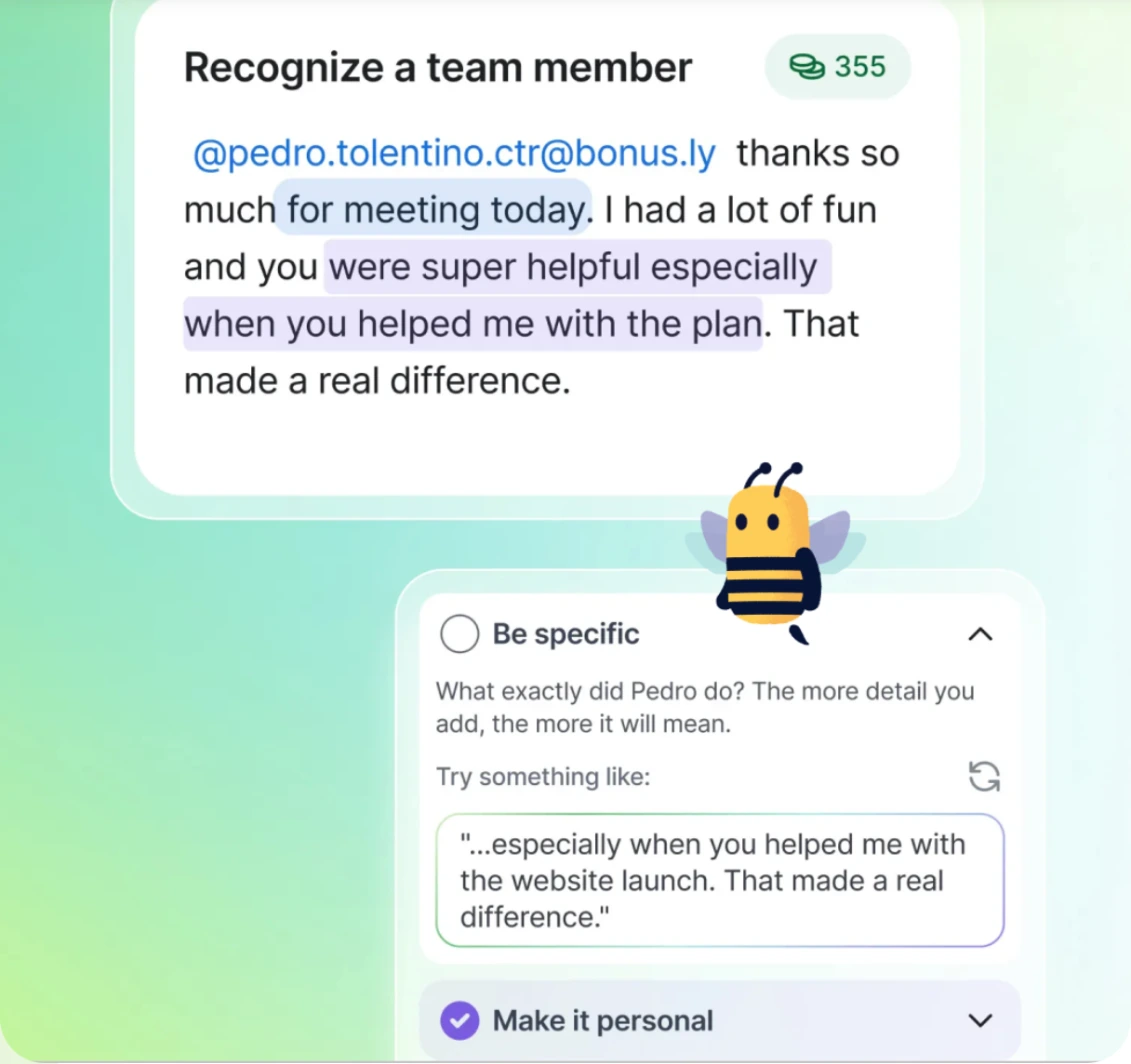
Bonusly with Bizy coaching a sender to make recognition more specific. Source: bonusly.com
Bonusly is a recognition platform first, so its AI measures engagement through appreciation rather than surveys. It belongs on this list for teams that see recognition as their main engagement lever.
Bizy, Bonusly’s AI assistant, flags teammates who have not been recognized lately and scores recognition on five dimensions: specific, contextual, values-aligned, personal, and genuine. Admins get engagement analytics by department, location, or manager, and can ask questions in plain language instead of exporting CSVs.
Bizy also surfaces check-in trends and helps prepare 1:1 agendas. Bonusly states that Bizy will not flag anyone as “at risk” or assign performance labels, which is a sensible line to draw.
Bonusly’s MCP server connects Claude, ChatGPT, and Cursor to recognition data and actions, at no extra charge. Organization plans include 1,000 MCP tool calls a month.
- AI highlights: recognition quality scoring; recognition gap alerts; engagement analytics in plain language; MCP server
- Pros: largest review base on this list; free plan for small teams; clear limits on AI judgment
- Cons: not a survey-led engagement platform; rewards are billed at face value on top of the license; Bizy raises the per-user price
- Ratings: G2 4.7/5 (7,398 reviews); Capterra 4.8/5 (1,611 reviews)
- Pricing: Free up to 8 users; Team $3 per user per month without Bizy or $5 with Bizy ($50 per user per year annually); Organization custom, as of October 2026.
How to choose an AI engagement platform
Start with the job you need AI to do, not the longest feature list. Then price the tool at your real headcount, because minimums and add-ons change the picture fast.
You want richer answers from shorter surveys
Choose a tool that uses AI during the survey, not only after it. Pulsewise asks AI-personalized follow-up questions inside the check-in, which keeps surveys short without losing the “why”.
If you are still drafting questions, start with our employee engagement survey questions library and adapt it to your cadence.
You need benchmarks to report to leadership
Culture Amp is the strongest choice for benchmarks and validated survey design. 15Five’s Predictive Impact Model is a good alternative if you care more about which driver to fix first than about industry comparisons.
Engagement must connect to performance and goals
Lattice and Leapsome both keep engagement beside reviews and goals. Pulsewise does the same in a smaller, faster workspace, and our employee engagement software pricing breakdown shows what each suite costs at 100 and 300 people.
Your managers live in Claude or ChatGPT
Check exactly what each MCP connector returns. Pulsewise, Culture Amp, and Leapsome expose engagement results; Lattice currently covers performance data, and Bonusly covers recognition.
Recognition is your main engagement lever
Bonusly gives you the most mature recognition AI. If you want recognition to feed growth conversations instead of a points balance, Pulsewise Kudos and Workleap Good Vibes take that route.
Running surveys, reviews, and recognition in four separate tools? See how Pulsewise connects pulse surveys, kudos, goals, feedback, and 1:1s in one workspace, with AI that suggests and people who decide.
Questions to ask in every AI demo
Bring these six questions to each vendor. The answers separate real AI from a relabeled report.
- What does the AI do during the survey, and what does it do after? Ask for a live example of a follow-up question or a comment summary.
- What is the minimum group size for AI summaries and assistant answers? It should match the dashboard threshold.
- Can I see the comments behind a summary? Traceability lets leaders check the AI before acting on it.
- Does any AI output score or flag individuals? Anonymous answers should never feed a personal risk score.
- Which data does your MCP connector return, and can admins revoke it? Ask whether engagement data is included today or only on the roadmap.
- What does AI cost at our headcount? Confirm credits, add-ons, minimums, and which plan includes each AI feature.
Track the answers in one sheet, alongside the engagement metrics you already report, so you compare tools on the same terms.
Closing
AI has made engagement data faster to read, but the useful tools do more than summarize. They ask a better question, point to the driver that matters, and hand a manager one clear next step, while keeping anonymous answers anonymous.
If you need benchmarks at scale, Culture Amp leads. If engagement must live beside performance, Lattice and Leapsome are proven choices, and 15Five is strong on prediction.
If you want AI inside the check-in itself, plus aggregate insights you can query from Claude or ChatGPT, try Pulsewise pulse surveys. Eligible teams can start on the free-forever launch offer, and our employee engagement guide covers the program around the tool.
FAQs
What are AI employee engagement tools?
AI employee engagement tools are platforms that use artificial intelligence to collect and interpret employee feedback. Common features include adaptive follow-up questions, comment theme and sentiment analysis, driver analysis, suggested manager actions, and assistant access through MCP. They work best when anonymity thresholds and human decision-making stay in place.
How is AI used in employee engagement surveys?
AI is used to personalize follow-up questions, summarize open-text comments into themes, label sentiment, and estimate which drivers most affect engagement. Some tools also suggest actions for managers or flag teams with declining scores. The survey design, the action, and any people decision should still come from a person.
Are AI engagement surveys still anonymous?
They can be, if the vendor applies the same minimum group size to AI summaries and assistant answers as to dashboards. Ask whether AI outputs can be traced to individuals, whether small groups are hidden, and whether anonymous answers ever feed a personal score. Confirm these settings before rollout.
Can AI predict employee attrition?
AI can highlight teams where engagement, recognition, or manager support is slipping, which often precedes turnover. Some vendors combine survey trends with HR data for this. Treat these signals as prompts for a conversation, not verdicts, and avoid individual risk scores built from anonymous survey answers.
How much do AI employee engagement tools cost?
Published prices in this guide start at about $4 per user per month for engagement modules from Lattice, Leapsome, and 15Five, as of October 2026. Lattice adds a $4,000 annual minimum, Workleap starts at $4,999 a year, and Culture Amp is quote-based. Pulsewise offers a free-forever launch workspace to eligible teams.
Which AI employee engagement tool is best for small and mid-sized companies?
For 50 to 500 employees, Pulsewise, Leapsome, and 15Five offer strong AI at accessible prices, while Lattice suits teams already running performance there. Culture Amp fits programs that need benchmarks. Choose by the AI job you need most: follow-up questions, comment analysis, prediction, or recognition.